

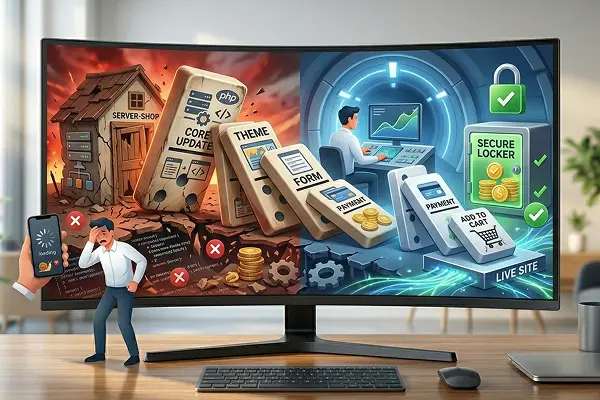
Imagine an intricate sculpture made of dominoes, where each piece is carved from smoked glass and rusty gears. A seemingly simple change—a core update—is like pushing the first fragile piece. If done without care, the chain reaction is devastating: the design collapses, payment functions break, and your digital business crumbles into an abyss of corrupted code.
In the website world, this happens every week, and it is called Software Incompatibility.
At DapSite, we receive emergency calls from desperate business owners who tried to “keep their site up to date” by clicking the update button and ended up with a white screen and an online store that can’t process payments. Here is why WordPress updates are a balancing act and how we handle them so you never lose a sale.
Your Web Ecosystem (A Delicate Puzzle)
Your website is not a solid block; it is a collection of pieces that must fit together perfectly:
-
The WordPress Core: The foundation of everything.
-
The Theme: What provides the design and appearance.
-
The Plugins: The functions (forms, payment gateways, galleries).
-
The PHP Version: The server engine (as seen in Article 21).
When one of these pieces is updated, the code changes. If the other three pieces aren’t updated at the same time, or if the programmer of one piece made a tiny error, the “puzzle” breaks. This is the Domino Effect.
The 3 Disasters of “Blind” Updates
Clicking “Update All” from your phone while having breakfast is one of the riskiest moves you can make. These are the consequences:
1. The Critical Error (The White Screen)
This is the worst-case scenario. Your site stops loading and shows a generic technical error message. To your customers, your business has vanished. To Google, your site is no longer reliable. Recovering a site in this state without technical knowledge can take hours or days.
2. “Silent” Feature Death
Sometimes the site still loads, but the “Add to Cart” button stops working, or the contact form where you receive leads stops sending emails. You could go days without receiving orders before realizing something broke internally.
3. The “Frankenstein” Design
A theme update can make your menus disappear, change font sizes, or misalign images. Your website goes from looking professional to looking like a neglected site in seconds.
Staging: The DapSite “Testing Zone”
Updating is mandatory for security, but doing it live is Russian roulette. That’s why, in our Support Plans, we use a technology called Staging.
Staging is an identical, private copy of your website that lives in a secure “testing vault.” Here is how we protect your business:
| The Process | The “Cross Your Fingers” Method | The DapSite Security Standard |
| Testing | Updates are applied directly to the live site customers see. | We create a Staging (clone) and update everything there first. |
| Verification | If something breaks, the site goes down and you panic. | If something fails in Staging, we fix it in private. Your real site keeps selling, unaffected. |
| Launch | It’s a coin toss. | Only when we confirm the clone is perfect do we push the changes to the live site. Zero risk. |
Conclusion: Technology Should Work for You, Not Against You
Updating your website is vital to prevent hacks, but it shouldn’t be a source of stress. The peace of mind of knowing that experts are testing every change before it affects your customers is priceless.
Are you afraid to touch the update button in your WordPress dashboard?
That fear is a sign that you need a technical team. With a DapSite Support Plan, we ensure your site always has the latest technology, maximum security, and, above all, that it never stops working.